If we go back to Wi-Fi 101 basics, we can talk about the 2.4 GHz band. In theory, there are 11 channels in the 2.4 GHz band. However, these 11 channels overlap. There is a valid reason for this, but we’ll save that history lesson for another time. We’ll also leave the 5 GHz band for later. For basic Wi-Fi purposes, there are only three usable non-interfering 2.4 GHz channels, 1, 6, and 11.
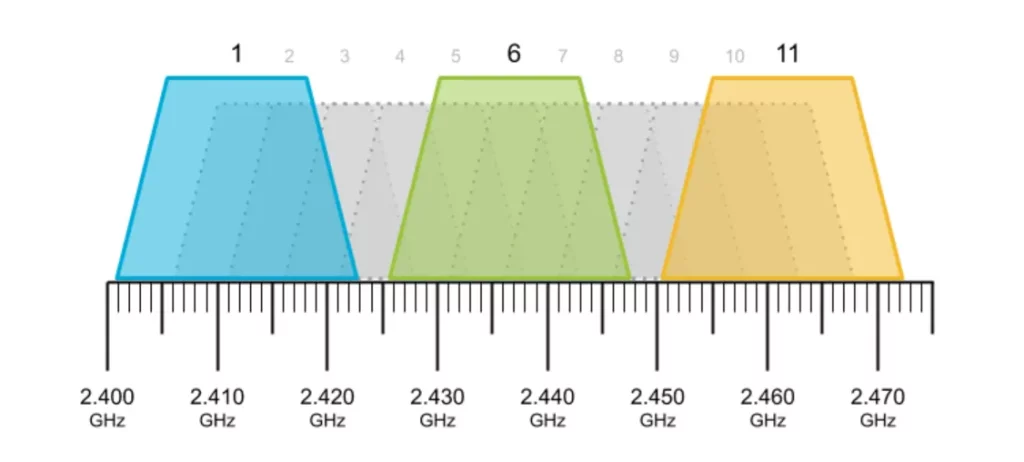
So, if you live in the middle of nowhere, your router can choose any one of these three channels and your devices can all happily get to the Internet by connecting to that router on that channel. No problem.
However, what if you live in an apartment building with four apartments? Well, the first three tenants will each be able to grab one of those three channels. But what about the fourth tenant? The fourth tenant will have no choice but to share one of the three channels already in use. So the fourth tenant, and the unlucky sharer, will automatically have potentially reduced bandwidth available. There is no technical problem with this; the Wi-Fi protocol handles it very smoothly. If two differerent routers want to talk at the same time, one of them just has to wait. In many cases, if the attached devices have very low demands, there may be no problems. But if both of the sharing users are heavy consumers (or producers) of data, then the delays may be noticable. And if there are 30 apartments in range, it gets even worse. But there are mitigations available; stay tuned.
If you don’t know what a party line is, it’s probably worth looking it up.
No responses yet